
How to Remove a Bad Review from Your Google Business Profile (What Actually Works)
Negative Google reviews can hurt your reputation, decrease local rankings, and turn potential customers away before they ever reach your website. But here’s the reality: you can’t just delete a bad review with a click.
Table of Contents
ToggleInstead, there are smart, ethical, and effective ways to handle bad reviews on Google — whether you believe they’re unjust, fake, or simply harmful to your business’s image. This guide breaks down what works, what doesn’t, and how to protect your online reputation while strengthening customer trust.
1. Know When Google Will (and Won’t) Remove a Review
Before taking action, it’s important to understand one critical fact:
Business owners cannot delete Google reviews themselves.
Only the person who posted the review has the power to remove it.
Google will step in only if a review violates its content policies — not simply because it’s negative or unfair. That’s why many removal requests fail.
The key is knowing exactly which types of reviews Google considers removable and which ones you’re better off responding to strategically.
Once you understand this distinction, you’ll avoid wasted time — and increase your chances of success.
2. Identify Why a Review Might Be Invalid
Ask yourself:
Was the reviewer ever a real customer?
Did they leave personal attacks, spam, or irrelevant content?
Is the review clearly offensive, abusive, or violates guidelines?
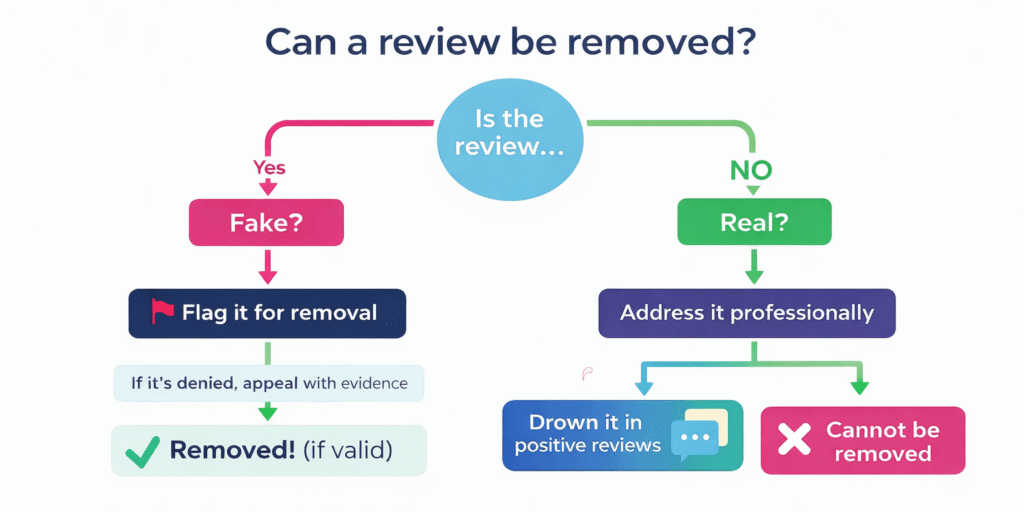
Reviews that Google may remove include:
Spam or fake reviews
Offensive or hate speech
Reviews that don’t relate to the actual business experience
Reviews posted by bots or users with no transaction history
If a review violates Google’s policy, you have a chance of getting it removed.
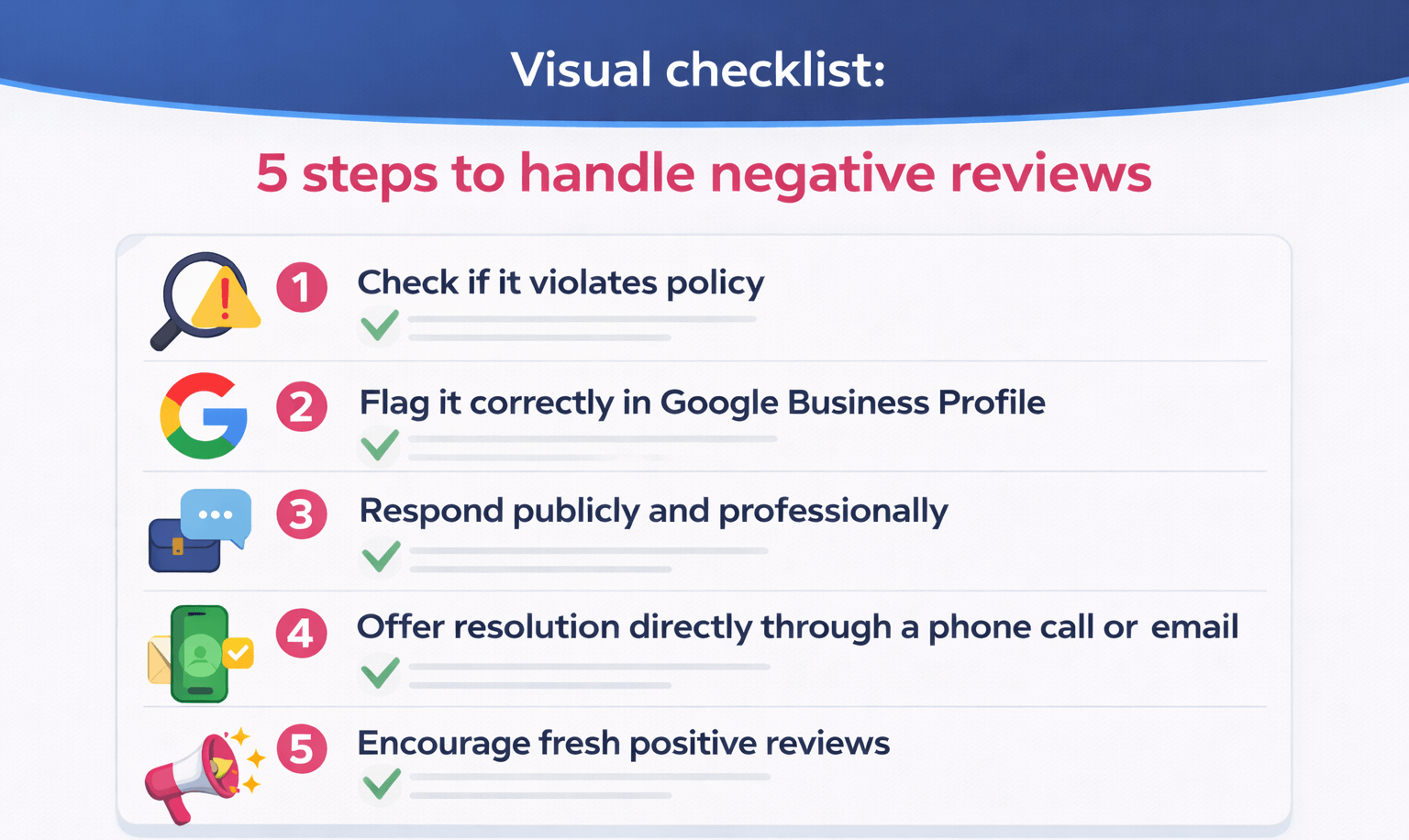
3. Flag the Review for Google to Review
This is the official first step.
How to do it:
Go to your Google Business Profile dashboard.
Open the Reviews section.
Find the review you want to remove.
Click the three dots next to the review.
Choose “Report review” or “Flag as inappropriate.”
Select the reason it violates Google’s review policies. Google Help
Once submitted, Google will evaluate the review. This can take a few days to a few weeks.
Tip: Be specific in your selection — don’t just choose “I don’t like this review.” Choose something like Spam or Irrelevant content when applicable.
4. Appeal If It’s Denied
If Google decides not to remove the review, don’t lose hope. You can appeal the decision by providing additional context — especially if you have evidence proving the reviewer was never a real customer.
This process is done through the Google Business Profile Support and can involve:
Submitting a support request
Choosing “Manage Customer Reviews”
Providing a reason and evidence
Waiting for Google’s re-evaluation
Sometimes an appeal works on the second try if you present more detailed justification.
5. Respond Publicly (Even If You Can’t Remove It)
You may not be able to remove every bad review — and that’s okay.
A thoughtful, professional reply does two things:
✅ Shows potential customers you care
✅ Often reduces the impact of the negative review
How to respond effectively:
Acknowledge the customer’s issue
Apologize genuinely
Offer a path to resolution (email, call, etc.)
Keep it brief and professional
Even when a review stays live, a good response can build trust with readers.
6. Reach Out to the Reviewer (When Possible)
If you know the reviewer is a real customer, consider a courteous direct message or email explaining the situation and offering a resolution. Often, a positive experience or a resolution can lead them to:
- Edit the original review
- Remove it entirely
- Replace it with a more balanced update
This is one of the most effective ways to handle genuine but negative feedback — because it turns a reputational threat into a customer care opportunity.

7. Encourage More Positive Reviews
One of the best indirect ways to “dilute” bad reviews is to encourage more positive ones. A strong set of recent, genuine reviews can overshadow an older or negative rating.
You can do this by:
- Asking satisfied customers to leave a review
- Including review links in emails, receipts, or SMS
- Offering incentives (e.g., discounts — where allowed)
- Making it easy to leave a review (QR codes, website buttons)
More positive reviews help your Google rating, local SEO rankings, and trust signals.
8. Don’t Fall for “Fake Removal” Services
Some companies claim they can guarantee removing your negative reviews from Google — sometimes for high fees. These services may use shady or unethical tactics (like DMCA takedowns without merit) that can backfire, damage your reputation, or get your business penalized.
Google’s policies are strict — you must provide legitimate reasons for removal. Avoid shortcuts that promise a “magic fix.”
9. Reputation Management Is Ongoing
Even without removal, you can still manage your online reputation effectively through:
- professional responses
- positive review campaigns
- review monitoring tools (like EmbedSocial)
- regular audits of your Google Business Profile
A proactive reputation strategy helps protect your brand from future issues and strengthens local SEO.
What This Means for Your Business
You can’t force Google to delete any review you dislike.
But if a review violates Google’s policies — spam, fake content, off-topic, or abusive — you can flag it and appeal.
If it’s legitimate feedback, you still have powerful options: respond professionally, resolve the issue, and encourage positive voices to show the world you’re a business that cares.
Online reputation isn’t just about deleting negative reviews — it’s about managing them wisely.
Frequently Asked Questions About Google Reviews
A bad review is feedback left by a customer that expresses dissatisfaction with a product, service, or experience. It may highlight issues like delays, poor communication, unmet expectations, or service quality. Bad reviews aren’t always unfair — many are genuine experiences and should be treated as feedback rather than attacks.
A negative review is any public rating or comment that lowers your overall perception online, typically reflected as a 1–3 star rating. Unlike fake reviews, negative reviews often come from real customers and point to gaps in service, expectations, or communication. Not all negative reviews violate Google’s policies.
Negative reviews can directly affect trust, click-through rates, conversions, and local search rankings. Many users read reviews before contacting a business, and even a single unresolved negative review can influence decisions. However, how you respond often matters more than the review itself.
Yes. Businesses that respond professionally to negative reviews often build more trust than those with only perfect ratings. Addressing issues openly shows accountability and transparency. When handled correctly, negative reviews can improve credibility and highlight your commitment to customer experience.
Most reviews appear on platforms like Google Business Profile, Facebook, Yelp, industry directories, and sometimes social media mentions. Google Business Profile is usually the most influential for local businesses, as reviews directly affect map rankings and visibility.
You can collect more reviews by asking at the right moment — after a successful service, purchase, or resolution. Share your Google review link via email, WhatsApp, SMS, or invoices. Make the process easy and never incentivize or force reviews, as that violates platform policies.
The most reliable way to earn positive reviews is by delivering a consistently good experience and proactively requesting feedback. Follow up politely, respond to all reviews (positive or negative), and show appreciation. Over time, fresh positive reviews naturally outweigh older negative ones.
Related Resources
Discover the strategy behind every ranking.
At GrowWeb Studios, we combine human expertise with the right SEO tools to analyze smarter, rank faster, and grow stronger—across India, the US, and beyond.
Learn why SEO fundamentals still drive AI visibility and how to future-proof your brand’s content for the next evolution of search.
Coming Soon….
